The steps in this tutorial are based on the public Token Station at models.bytefuture.ai. If you would like to set up your own private Token Station instance and save costs through pooled subscriptions, discounted API keys, and smart routing, get in touch.
Cursor supports custom OpenAI-compatible providers through Settings → Models. Point it at Token Station’s endpoint and you can add OpenAI’s GPT-6 Astra and the GPT-5.6 family (Sol, Terra, Luna) as selectable models, each billed through your own Token Station key.
OpenAI is sunsetting its built-in support in Cursor, so BYOK is how you run its models there going forward. One thing to know up front: Cursor’s built-in integration calls OpenAI’s /responses API while its BYOK path calls /chat/completions, and Cursor does not parse the tool calls out of a /chat/completions response correctly. That is a Cursor bug, not an OpenAI or Token Station one, and the WASM adapter you attach in Step 1 is a stop-gap that converts OpenAI’s responses into a format Cursor accepts.
What you need before starting
- Cursor installed (cursor.com/download).
- A Token Station account and API key. Sign up free at models.bytefuture.ai, no card required.
- Cursor Pro. Custom-model selection in Agent mode is gated on the Free plan, even with your own API key, so you’ll need Pro ($20/month) for anything past Chat mode.
Step 1: Create a Token Station API key with the OpenAI adapter attached
In the Token Station dashboard, open API Keys and click Create new key. Give it a name (Cursor works fine) and click Create key. Copy it immediately: it’s shown once and won’t be displayed again.
Back on API Keys, find the key you just created and click Edit. Under WASM middleware, it starts as “No WASM middleware assigned.” Open the Select WASM module dropdown and choose Cursor ↔ OpenAI adapter, the entry that reformats OpenAI tool-call responses into the shape Cursor’s Agent mode expects. Click Save changes. You’ll see a confirmation banner (“WASM middleware installed and validated”), and the key’s row in the Active keys table now lists the adapter under the WASM column.
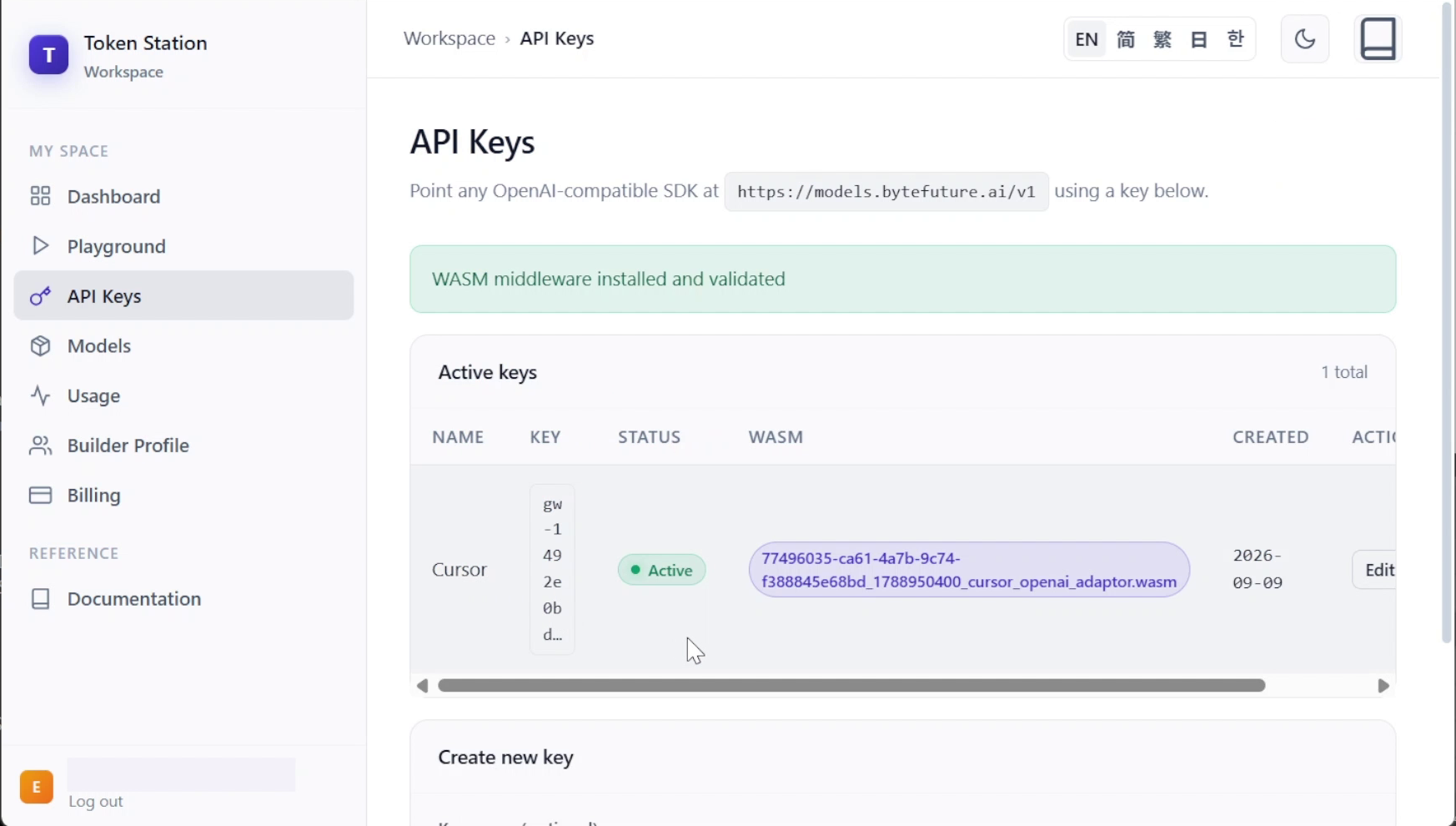
Don’t skip this. Without the adapter attached, everything else here still works, but Agent mode will read and discuss code without ever changing a file.
Step 2: Register Token Station as a custom provider
Open Settings → Cursor Settings → Models, scroll to API Keys, and set two fields:
- OpenAI API Key: the Token Station key you just attached the adapter to.
- Override OpenAI Base URL: toggle it on, and replace the default (
https://api.openai.com/v1) withhttps://models.bytefuture.ai/v1.
Turning on the OpenAI API Key toggle asks you to confirm first: “Are you sure you want to enable your own OpenAI API key? Several of Cursor’s features require custom models (Tab, Apply from Chat, Agent), which cannot be billed to an API key.” Confirm to proceed; that’s expected.
Don’t rely on a “Verify” button to confirm the key and URL are correct. It isn’t always present, and even when it is, it doesn’t cover every path. The reliable check is adding a model and actually sending it a message, covered next.
Step 3: Add the OpenAI family as custom models
Still in Models settings, scroll to the bottom of the model list to the custom-model field, type each full route, and click Add:
openai/gpt-6-astra
openai/gpt-5.6-sol
openai/gpt-5.6-terra
openai/gpt-5.6-luna
The same naming gotcha as our Claude and Grok setups, and an easy one to trip on here specifically: you might assume that since these are registered under Cursor’s own “OpenAI API Key” field, you can type the bare model name. You can’t. Cursor sends whatever name you register here verbatim as the model field in its request, and Token Station’s actual route names all carry the provider prefix. Register plain gpt-6-astra and the request fails with Model 'gpt-6-astra' not found; register openai/gpt-6-astra and it works.
| Model | Cost (input/output per M) | Good for |
|---|---|---|
openai/gpt-6-astra |
$10 / $50 | The hardest, longest agentic sessions: multi-file refactors and long Agent-mode runs where fewer correction rounds matter more than per-token cost. |
openai/gpt-5.6-sol |
$5 / $30 | A flagship default for most coding-agent steps at half Astra’s price. |
openai/gpt-5.6-terra |
$2.50 / $15 | Repeated implementation and debugging loops. |
openai/gpt-5.6-luna |
$1 / $6 | Switching the main chat to directly for lighter, single-turn questions, exploration, or triage. |
Step 4: Confirm Agent-mode file edits actually apply
With the adapter attached, edits land. Here’s all four routes added, then openai/gpt-5.6-luna selected and asked to make a real edit against a real repository (httpie):
The prompt: “please update the edit at the top of the readme to say ‘model: gpt-5.6-luna’.” Cursor read README.md, applied the change, and reported back “Worked for 8s. Edited README.md, explored 1 file, +1 -1,” with a diff replacing a leftover test marker with <!-- model: gpt-5.6-luna -->. A real edit landed in a real file, not a description of one in chat.
Token Station’s dashboard confirms the same thing from the billing side:
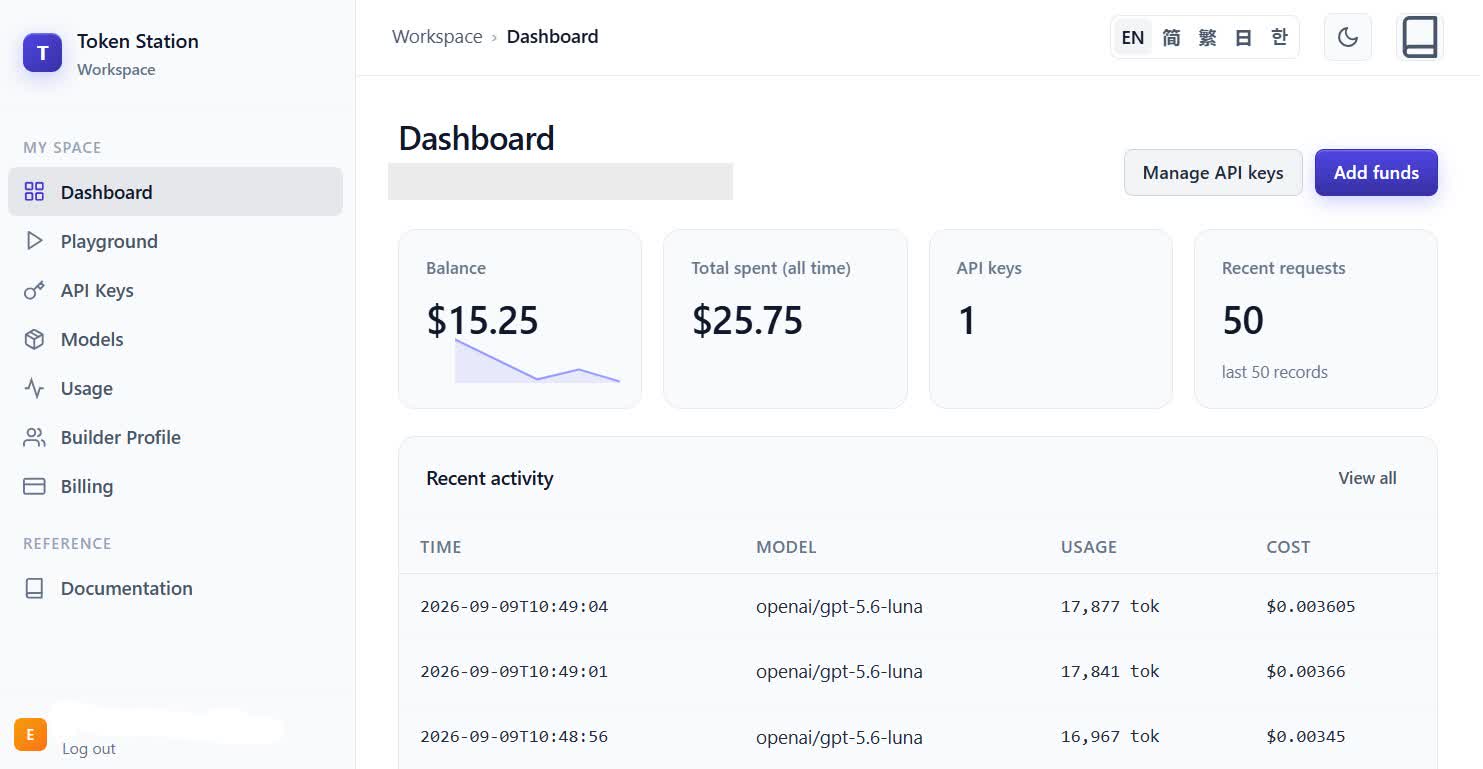
All four routes, openai/gpt-6-astra, openai/gpt-5.6-sol, openai/gpt-5.6-terra, and openai/gpt-5.6-luna, are confirmed working end to end this way: real file edits, correctly billed, through the same adapter attached in Step 1.
Step 5: Define scoped subagents
Cursor supports subagents: markdown files with YAML frontmatter, defined per-project in .cursor/agents/ or globally in ~/.cursor/agents/. Two useful roles for a coding session: a read-only researcher, and a test verifier that runs after a change.
.cursor/agents/bill-the-explorer.md
---
name: bill-the-explorer
description: Searches and reads the codebase to answer questions about existing code. Use proactively before implementing anything unfamiliar.
model: inherit
readonly: true
---

You are a fast, read-only research agent. Find and summarize relevant
files, functions, and patterns. Never edit files or run mutating commands.
.cursor/agents/jill-the-test-runner.md
---
name: jill-the-test-runner
description: Runs the test suite and reports pass/fail results with failure details. Use proactively after any code change.
model: inherit
---

You run the project's test command, capture output, and report which
tests passed or failed and why. Do not modify source files.
We’re using model: inherit rather than naming a specific route: as documented in our Claude setup, Cursor’s Task tool only accepts inherit or its own composer-2.5-fast for a subagent’s model, regardless of what a custom agent file specifies. That’s a Cursor platform limitation, not something specific to OpenAI’s models, so every subagent here runs on whichever main model the parent conversation is using. Everything else about a subagent is honored regardless: name, description, and readonly all work as documented, and both automatic invocation (the main agent reads each description and decides when to hand off) and explicit invocation (/bill-the-explorer) trigger a real delegation.
Name your subagents something that won’t collide with one of Cursor’s own built-in agents. explore is a real built-in name and gets silently misrouted there instead of your own definition, with no error to explain why. bill-the-explorer and jill-the-test-runner avoid that.
If you create these files by asking the agent in chat to write them rather than doing it from a terminal, and the sidebar still shows no subagents afterward, reload the window (Ctrl+Shift+P → “Reload Window”): Cursor doesn’t always rescan .cursor/agents/ live.
Try it yourself: the same httpie task
Our Claude Sonnet 5 setup ran a full coding session against a real feature in httpie: adding the effective URL (the URL actually reached after following any redirects) to httpie’s --meta output, next to the existing elapsed time, delegating research and verification to the two subagents above.
We haven’t yet run that specific multi-step, multi-agent session against GPT-6 Astra or the GPT-5.6 family, so this is a “try it yourself” rather than a report on what happened. Step 4 confirms all four routes apply real Agent-mode file edits through Token Station, so the same three-message sequence is worth trying:
Message 1, to delegate research:
/bill-the-explorer find how elapsed time is computed and displayed in HTTPie's --meta output, and identify where to add the effective URL, the URL actually reached after following any redirects, alongside it.Message 2, back to the main agent, once research comes back:
Using what bill-the-explorer found, add the effective URL next to the existing elapsed time in HTTPie's --meta output. Add a test that confirms it works for both a redirected and a non-redirected request.Message 3, to delegate verification:
/jill-the-test-runner verify the new effective-URL test passes, along with the rest of the test suite. Report any failures separately from the two known pre-existing Big5 charset-detection failures in tests/test_encoding.py, which are unrelated to this change.What works today
Agent-mode file edits are confirmed working for all four OpenAI routes, openai/gpt-6-astra, openai/gpt-5.6-sol, openai/gpt-5.6-terra, and openai/gpt-5.6-luna, through Token Station in Cursor: real edits applied to real files, correctly billed to your Token Station key, visible on the dashboard. Without the adapter from Step 1, those same routes read and discuss code in Agent mode but never edit a file.
Subagents work for scoping and permissions: name, description, and readonly are all honored, and both automatic and explicit (/name) invocation trigger real delegation. Subagent-level model routing does not currently work for custom models, regardless of provider: Cursor’s Task tool only accepts inherit or its own composer-2.5-fast, so every subagent runs on the parent conversation’s model. That’s the same Cursor platform limitation documented in our Claude and Grok setups, not something specific to OpenAI’s models.
Get started
Sign up at models.bytefuture.ai: no card required, with a 100% match up to $50 on your first top-up. Export your key, attach the OpenAI adapter, wire it into Cursor’s Models settings, and add the routes above.