Hermes Agent is Nous Research’s open-source autonomous agent: a desktop app and a CLI/TUI, not an IDE plugin, with persistent memory, a skill system, and real subagent delegation. Like the rest of this series, it supports any OpenAI-compatible custom endpoint, so pointing it at Token Station gets you OpenAI’s GPT-5.6 family (Sol, Terra, Luna) as selectable models, billed through your own Token Station key.
The reason this one earns its own article: Hermes’s delegation feature actually lets a subagent run on a different model than the parent conversation. That’s not true everywhere. Our Cursor series had to document that Cursor’s subagent model: field is valid, documented syntax that turns out to be a no-op, every subagent silently runs on the parent’s model regardless of what you specify. Hermes’s delegation.model and delegation.provider config genuinely route delegated work to a different model, confirmed below with both models showing up billed separately on Token Station’s own dashboard.
Before the setup, the same reasoning applies here as with any tool routed through Token Station rather than paying a provider directly: cost visibility (every request bills at the provider’s real rate, zero markup, visible on your own dashboard) and consolidation (the same key and the same model IDs work across every tool you use, Hermes included, instead of separate keys and bills per tool).
What you need before starting
- Hermes Agent installed. Desktop app from hermes-agent.nousresearch.com, or the CLI-only install:
curl -fsSL https://hermes-agent.nousresearch.com/install.sh | bash(Linux/macOS/WSL2) oriex (irm https://hermes-agent.nousresearch.com/install.ps1)(Windows PowerShell). - A Token Station account and API key. Sign up free at models.bytefuture.ai, no card required.
Step 1: Register Token Station as a custom endpoint
In the Hermes desktop app, open Settings → Providers → Custom Endpoints, then + Add Endpoint:
- Name:
Token Station - Provider ID:
token-station - Endpoint URL:
https://models.bytefuture.ai/v1 - Default Model:
openai/gpt-5.6-sol - Context:
1050000(Sol’s real context window on Token Station; don’t leave this on “Auto” without checking what it resolves to) - API Key: your Token Station key
- Leave Use for new chats and Discover models checked
Click Test before Save. With Discover models on, a working endpoint returns every model your key can see: the confirmation read “Endpoint is reachable. Found 14 models.” Save it, and the model picker’s “TOKEN STATION” section lists the whole catalog, Sol and Luna included, no second endpoint needed.
Don’t stop at a green Test result. Start a new session, actually pick openai/gpt-5.6-sol, and send a trivial message. A real reply is the only proof the key, URL, and model name are all correct end to end.
Step 2: Confirm real tool-use, not just chat
A model that replies in chat isn’t the same as a model that can actually act. Switch to the CLI (hermes in a terminal) and give it something that requires writing a real file:
This is the same trap that hit the Cursor+OpenAI article before a fix landed there: reading and discussing code is not the same as editing it. Here, no fix was needed. Sol wrote unit_conversion.py, ran printf '10\n' | python C:\Users\ethan\unit_conversion.py, and reported the actual output (“Test run with 10 inches produced 25.4 centimeters”) rather than describing what the code should do.
Step 3: Point delegation at a cheaper model
Hermes’s delegated subtasks can run on a different model than the parent conversation, set via delegation.model and delegation.provider. You can set these from a chat session by asking Hermes to run the commands itself, since it has its own terminal tool:
hermes config set delegation.model openai/gpt-5.6-luna
hermes config set delegation.provider token-station
Hermes confirmed both: “Set and verified: delegation.model = openai/gpt-5.6-luna” and “Set and verified: delegation.provider = token-station”. Worth double-checking rather than trusting the confirmation text alone:
hermes config get delegation.model
hermes config get delegation.provider| Model | Cost (input/output per M) | Role in this setup |
|---|---|---|
openai/gpt-5.6-sol |
$5 / $30 | Main agent: plans the work, delegates a bounded subtask. |
openai/gpt-5.6-luna |
$1 / $6 | Delegated worker: executes a well-scoped piece handed to it. |
openai/gpt-5.6-terra |
$2.50 / $15 | Also available on the same endpoint; not used in this demo. |
Step 4: Confirm delegation actually lands on the cheaper model
With unit_conversion.py already in place from Step 2, a task that clearly calls for delegating a bounded subtask:
Add input validation to unit_conversion.py. Delegate to a subagent (via delegate_task) the job of writing three test cases covering negative numbers, zero, and non-numeric input, with context that the file lives at C:\Users\ethan\unit_conversion.py and takes inches, outputs centimeters. Once the subagent returns, incorporate its test cases into a new test_unit_conversion.py, then run it and report the results.Hermes spawned the subagent with a scoped, self-contained brief: “Write three unit-test cases for unit_conversion.py covering negative numbers, zero, and non-numeric input. Return the complete test code and briefly state the expected behavior for each case. Do not modify files.” Subagents in Hermes get zero parent conversation history, so the goal and context have to be complete on their own, which they were here: the subagent wrote the tests, and Sol incorporated them into test_unit_conversion.py, added the actual input validation to unit_conversion.py, and ran the suite.
The proof that delegation genuinely used a second model: Token Station’s Usage page, request history, for the minutes this session ran.
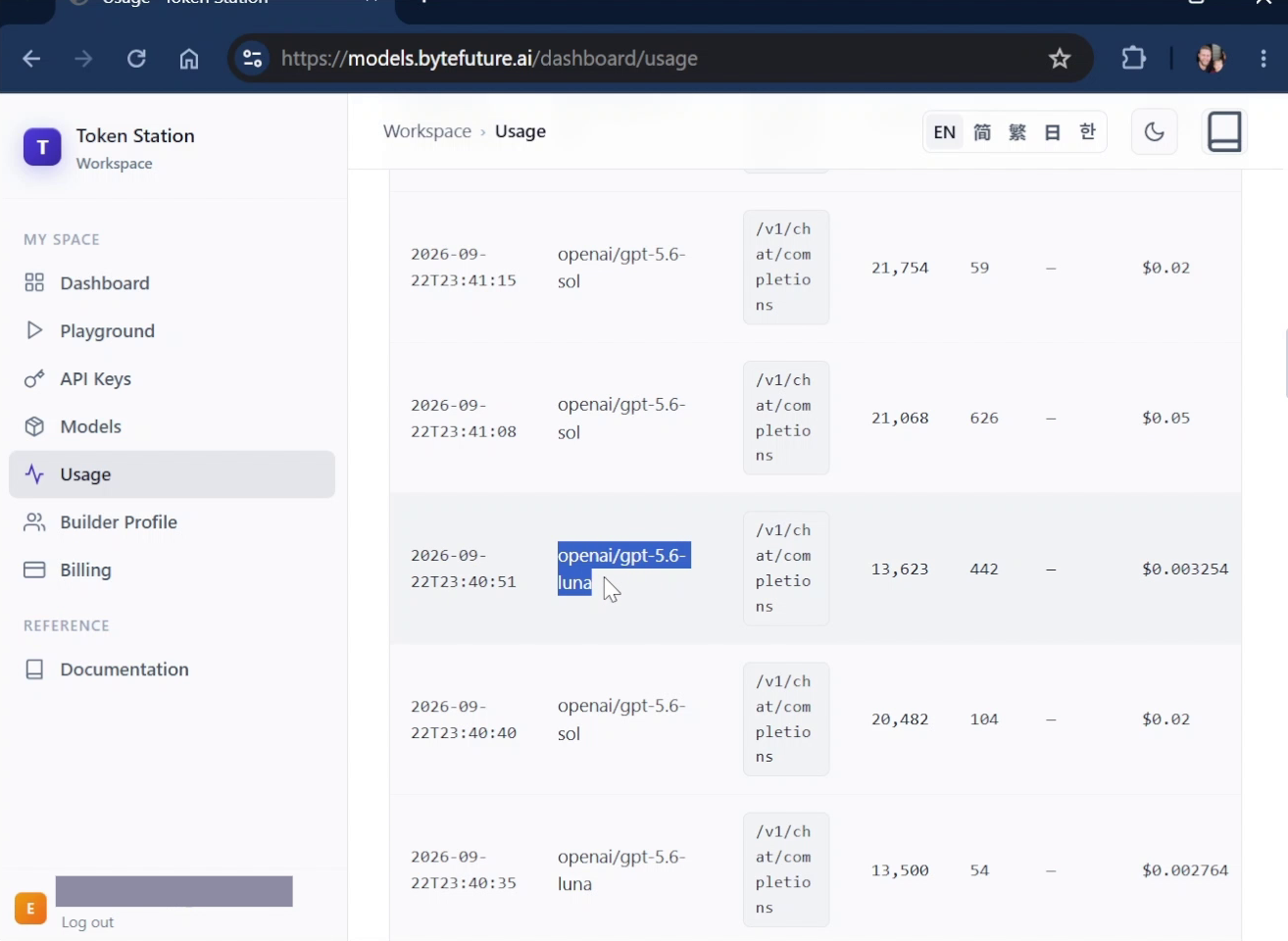
openai/gpt-5.6-sol and openai/gpt-5.6-luna requests alternate in the log within the same few minutes, each with its own token count and cost. That’s the frontier-planner/cheap-worker pattern actually working, not asserted from documentation.
What works today
Registering Token Station as a custom OpenAI-compatible endpoint in Hermes works via the desktop app’s Settings, with the full catalog auto-discovered from one endpoint. Real tool-use, writing and running an actual file, is confirmed for openai/gpt-5.6-sol, beyond simple chat replies. Delegation to a different, cheaper model on the same Token Station key is confirmed working end to end: delegation.model and delegation.provider genuinely route a delegate_task call to openai/gpt-5.6-luna while the parent conversation stays on openai/gpt-5.6-sol, and both show up billed separately on Token Station’s dashboard in the same session.
openai/gpt-5.6-terra is available on the same endpoint through the same setup; this article didn’t specifically exercise it.
Get started
Sign up at models.bytefuture.ai: no card required, with a 100% match up to $50 on your first top-up. Export your key, register it as a custom endpoint in Hermes, and add the routes above.