Hermes Agent 是 Nous Research 的开源自主 agent:一个桌面应用加一个 CLI/TUI,不是 IDE 插件,具备持久记忆、技能系统,以及真正的 subagent 委派。和本系列的其他工具一样,它支持任意 OpenAI 兼容的自定义 endpoint,把它指向 Token Station,就能把 OpenAI 的 GPT-5.6 系列(Sol、Terra、Luna)添加为可选模型,全部通过你自己的 Token Station key 计费。
这篇文章之所以值得单独写:Hermes 的委派功能真的能让 subagent 运行在和主对话不同的模型上。这一点并不是普遍成立的。我们的 Cursor 系列文章不得不记录下这样一个事实:Cursor 的 subagent model: 字段是有效的、文档化的语法,但实际上是个空操作,不管你指定什么,每个 subagent 都会悄悄运行在主对话的模型上。Hermes 的 delegation.model 和 delegation.provider 配置则真正把委派出去的工作路由到另一个模型,下文会用两个模型分别计费、都出现在 Token Station 自己的控制台上这一点来确认。
在开始配置之前,这里的道理和把其他工具通过 Token Station 路由、而不是直接付费给某个 provider 是一样的:成本可见性(每个请求都按 provider 的真实费率计费,零加价,显示在你自己的控制台里)和统一管理(同一个 key、同一批模型 ID 在你用的每个工具上都能用,Hermes 也不例外,而不必给每个工具单独准备 key、单独出账单)。
开始之前需要准备什么
- 已安装 Hermes Agent。桌面应用下载地址 hermes-agent.nousresearch.com,或者只安装 CLI:
curl -fsSL https://hermes-agent.nousresearch.com/install.sh | bash(Linux/macOS/WSL2),或iex (irm https://hermes-agent.nousresearch.com/install.ps1)(Windows PowerShell)。 - 一个 Token Station 账户和 API 密钥。免费注册:models.bytefuture.ai,无需信用卡。
步骤 1:将 Token Station 注册为自定义 endpoint
在 Hermes 桌面应用中,打开 Settings → Providers → Custom Endpoints,然后点击 + Add Endpoint:
- Name:
Token Station - Provider ID:
token-station - Endpoint URL:
https://models.bytefuture.ai/v1 - Default Model:
openai/gpt-5.6-sol - Context:
1050000(Sol 在 Token Station 上真实的上下文窗口;不要在没有确认它实际解析成什么之前,就把这里留在 “Auto”) - API Key:你的 Token Station 密钥
- 保持 Use for new chats 和 Discover models 的勾选状态
在点击 Save 之前先点击 Test。打开 Discover models 后,一个能正常工作的 endpoint 会返回你的 key 能看到的所有模型:确认信息是 “Endpoint is reachable. Found 14 models.”。保存后,模型选择器里的 “TOKEN STATION” 分区就会列出完整目录,Sol 和 Luna 都在其中,不需要再建第二个 endpoint。
不要止步于一个绿色的 Test 结果。打开一个新会话,真正选中 openai/gpt-5.6-sol,发送一条无关紧要的消息。只有收到真实的回复,才能证明 key、URL 和模型名称端到端都是正确的。
步骤 2:确认真正的工具调用,而不只是聊天
一个能在聊天里回复的模型,不等于一个真的能采取行动的模型。切换到 CLI(在终端里运行 hermes),交给它一个需要真正写文件的任务:
这正是 Cursor+OpenAI 那篇文章在修复上线之前踩到的同一个坑:读代码、讨论代码,和真正修改代码不是一回事。这次不需要任何修复。Sol 写出了 unit_conversion.py,运行了 printf '10\n' | python C:\Users\ethan\unit_conversion.py,并报告了实际的输出(“Test run with 10 inches produced 25.4 centimeters”),而不是描述代码应该做什么。
步骤 3:把委派指向一个更便宜的模型
Hermes 委派出去的子任务可以运行在和主对话不同的模型上,通过 delegation.model 和 delegation.provider 设置。你可以在一个聊天会话里让 Hermes 自己运行这些命令来完成设置,因为它自带终端工具:
hermes config set delegation.model openai/gpt-5.6-luna
hermes config set delegation.provider token-station
Hermes 对两者都做了确认:“Set and verified: delegation.model = openai/gpt-5.6-luna” 和 “Set and verified: delegation.provider = token-station”。比起只相信确认文本,更值得再核实一遍:
hermes config get delegation.model
hermes config get delegation.provider| Model | Cost (input/output per M) | Role in this setup |
|---|---|---|
openai/gpt-5.6-sol |
$5 / $30 | 主 agent:负责规划工作,把一个范围明确的子任务委派出去。 |
openai/gpt-5.6-luna |
$1 / $6 | 委派出去的执行者:执行交给它的、范围明确的一部分工作。 |
openai/gpt-5.6-terra |
$2.50 / $15 | 同一个 endpoint 上也能用;这次演示没有用到它。 |
步骤 4:确认委派真的落到了更便宜的模型上
既然步骤 2 里已经有了 unit_conversion.py,这里是一个明显需要委派一个范围明确的子任务的任务:
Add input validation to unit_conversion.py. Delegate to a subagent (via delegate_task) the job of writing three test cases covering negative numbers, zero, and non-numeric input, with context that the file lives at C:\Users\ethan\unit_conversion.py and takes inches, outputs centimeters. Once the subagent returns, incorporate its test cases into a new test_unit_conversion.py, then run it and report the results.Hermes 用一段范围明确、自成一体的说明生成了这个 subagent:“Write three unit-test cases for unit_conversion.py covering negative numbers, zero, and non-numeric input. Return the complete test code and briefly state the expected behavior for each case. Do not modify files.”。Hermes 里的 subagent 完全拿不到主对话的历史记录,所以目标和上下文必须自己讲清楚,这里确实做到了:这个 subagent 写出了测试,Sol 把它们整合进 test_unit_conversion.py,给 unit_conversion.py 加上了真正的输入校验,然后运行了整个测试套件。
证明委派真的用到了第二个模型的证据:Token Station 的 Usage 页面,这次会话运行的那几分钟里的请求历史。
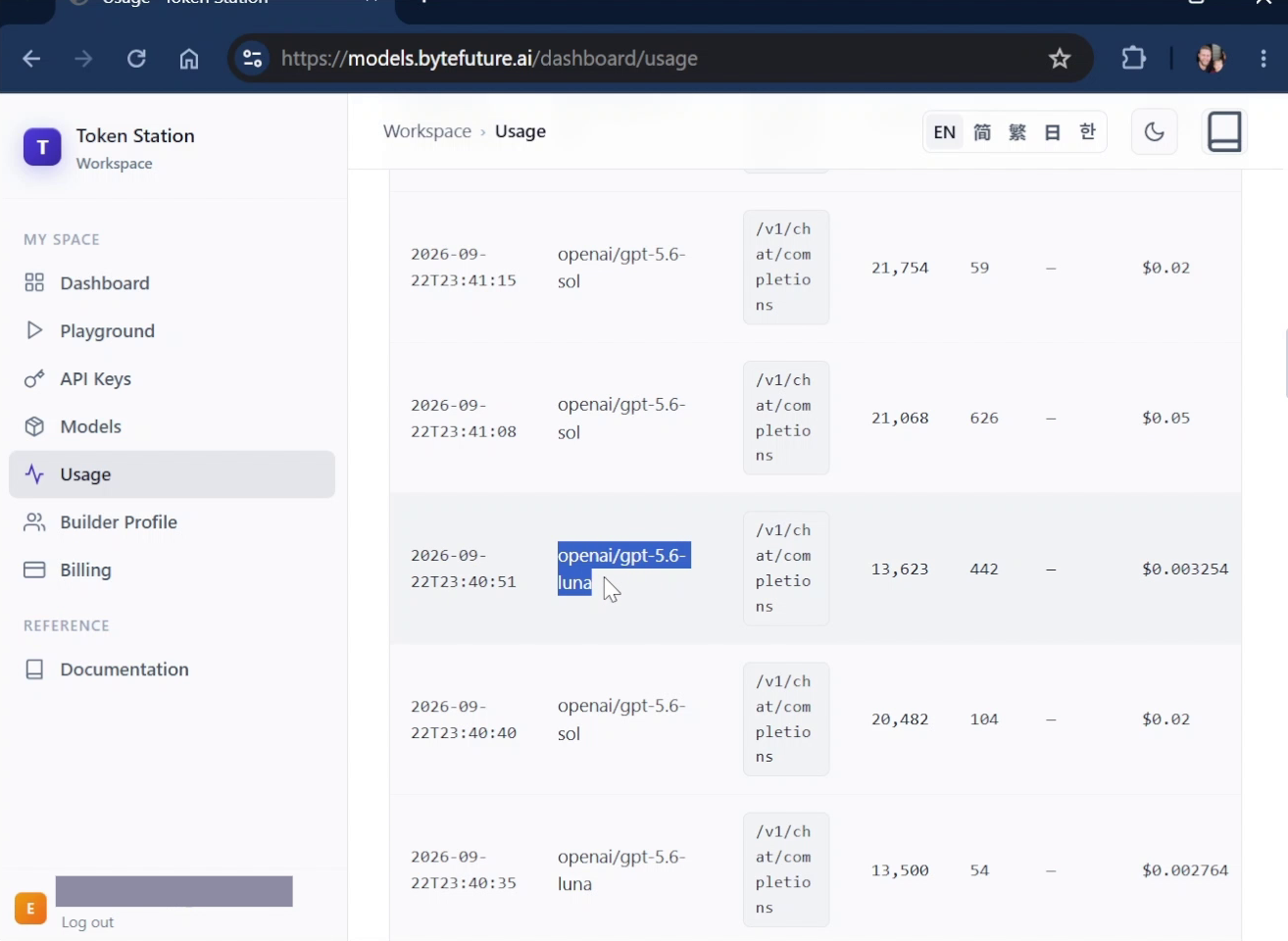
openai/gpt-5.6-sol 和 openai/gpt-5.6-luna 的请求在日志里的同一几分钟内交替出现,各自有自己的 token 数和费用。这才是“前沿模型规划、便宜模型执行”这套模式真正在起作用,而不是靠文档里的说法。
目前能用的
在 Hermes 里把 Token Station 注册为自定义 OpenAI 兼容 endpoint,通过桌面应用的 Settings 就能完成,一个 endpoint 就能自动发现完整目录。真正的工具调用,也就是写文件并运行一个真实文件,已经在 openai/gpt-5.6-sol 上得到确认,而不只是简单的聊天回复。把委派工作交给同一个 Token Station key 下的另一个更便宜的模型,也已经确认端到端可用:delegation.model 和 delegation.provider 真的会把一次 delegate_task 调用路由到 openai/gpt-5.6-luna,同时主对话仍然留在 openai/gpt-5.6-sol 上,两者在同一个会话里各自单独计费,都能在 Token Station 的控制台上看到。
openai/gpt-5.6-terra 在同一个 endpoint、同一套配置下也可以用;这篇文章没有专门测试它。
开始使用
前往 models.bytefuture.ai 注册:无需信用卡,首次充值最高可获得 100% 的等额奖励,最多 50 美元。导出你的密钥,在 Hermes 里把它注册为自定义 endpoint,然后加上上面这些路由。